
Ecommerce performance slumping? A quick way to fix what's important.
Earlier this week, we took a look at how simple tweaks can often improve your site’s business performance without requiring a total redesign. But what if that doesn’t do enough? What do you do next? Wouldn’t be great if there was a simple way to know where you should focus your efforts?
Actually, there is. It requires very little work and it will tell you exactly where to put your energies. It’s a simple technique designed to put your attention where your pages – and your customers – need it most.
And make sure you read to the end. Once we’ve explained the technique, we’ve made it even simpler for you to do.
Ready? Let’s get started.
As with most things when running a website, we’re going to start by looking at a key metric. In your favorite analytics tool, find the report that shows how many visits you get to each page on your site. In Google Analytics, we’ll use the Top Content report which looks like this:
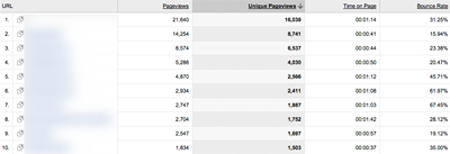
Order the report by the number of Unique Pageviews (we’re using that as a proxy for visits) and expand the number of entries until you can see most of your site’s traffic (25 or 50 usually gives you both a meaningful number as well as a manageable number for later steps).
You’re also going to want to look at Bounce Rate. Fortunately, Google Analytics provides this in the same report. Ultimately, we’re going to pull this data into Excel, so if it’s on a separate report in your analytics tool, that’s OK, too.
Open up Excel (or Numbers or Google Spreadsheet or what-have-you) and create a new workbook with four columns. The first should contain the page name or URL, the second should have your visits per page, the third bounce rate and the final should contain a calculated field called Lost Prospects. Calculate that field by multiplying visits times bounce rate.
Got that? Then copy in your visits and bounce rate data. When you’re done, your spreadsheet should look like this:
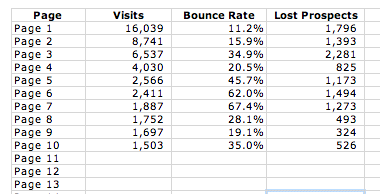
You’re looking for the pages that have the highest Lost Prospects value. And that’s where to start your optimization efforts. By lowering the bounce rate (anything above 25%-30% is high) on your most visited pages, you have the greatest chance of moving customers along your purchase path.
If you’re dealing with more than just a few pages, it’s often easier to chart it, like this:
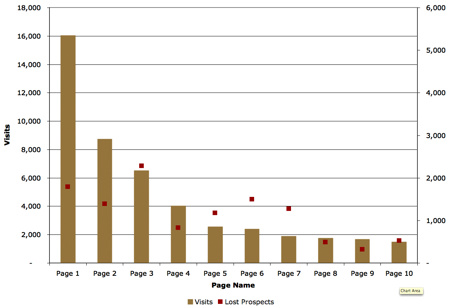
In this example, while “Page 1” gets over three times the traffic, the higher bounce rate on “Page 3” has over a quarter more Lost Prospects than any other page. After changing “Page 3,” the next steps would be to look at “Page 1” and “Page 6.” Focusing on just these three pages has the greatest potential, accounting for almost half the Lost Prospects in this example. You don’t always have to think in terms of redesigning your site. Think in terms of improving your customer experience on key pages first.
Cool, eh? Well, now for the really simple bit. Here at thinks, we like to make your life even easier. We’ve gone ahead and created an Excel spreadsheet for you to create this chart. All you’ve got to do is plug in your numbers and the chart will show you the problem pages.
By working to improve high-traffic, high-bounce pages you’ve got the greatest opportunities to help your business grow. So, what now?
Like this post? Subscribe to thinks today and you’ll never miss an update.

[…] you lots about what your customers want. The fine folks at GrokDotCom picks up where we left off looking at bounce rate to set priorities and examines what your bounce rate is trying to tell you. And FOT Linda Bustos shares Get […]
[…] Focus on what matters first. […]
[…] we’ve looked at metrics to find your underperforming pages before, what do you do when nothing obvious jumps out? What do you do first? Easy. Start from the […]
[…] Meaningful changes take less time to show up. If you don’t see a significant lift in a timely period, it may mean the new version isn’t working dramatically better than the original. If that’s the case, the amount of time it takes to collect the data isn’t the problem; the lack of lift is. Put your focus on the areas where you’ll see greatest improvement. Not sure where to start? Check out the tips here, here and here. […]
[…] E-commerce performance slumping? A quick way to fix what’s important […]
[…] of Tim Ash – you need to give your customers clear actions of what you want them to do next. Find the most visited page on your site with the highest bounce rate. Plug the hole. […]
[…] You might think that improving bounce rate by 1% – or 100 visits in this case – would be worth $150. But don’t forget to measure the value of your lost prospects. […]
[…] Pick one page on your site. Don’t know which page? Find the best candidate with our “Lost Prospects” calculator. […]
Hi Tim , recently i have launched a new cometics web shop , but dont get any selling yet , can you give some tips ?
one of my landing pages from PPC is http://www.caprice-cosmeticshop.com/mm5/merchant.mvc?Store_Code=CC&Screen=PROD&Product_Code=1604
Help is Very Appreciated